'%3e%3cpath%20fill='%23C0E1E2'%20d='M7%200H4v20h3V0Z'%20/%3e%3cpath%20fill='%23C0E1E2'%20d='M16%2010h-3v10h3V10Z'%20/%3e%3cpath%20fill='%23C0E1E2'%20d='M0%2013v3h20v-3H0Z'%20/%3e%3cpath%20fill='%23C0E1E2'%20d='M0%204v3h10V4H0Z'%20/%3e%3cpath%20fill='%2360B2B6'%20d='M19.996%204v3H13V0h3v4h3.996Z'%20/%3e%3c/g%3e%3cdefs%3e%3cclipPath%20id='clip0_1029_1800'%3e%3cpath%20fill='%23fff'%20d='M0%200h20v20H0z'%20/%3e%3c/clipPath%3e%3c/defs%3e%3c/svg%3e) Data Editor
Data Editor  Subscribe
Logging for Your Business Central App
When developing software, a common problem often arises: how can we understand what happened during execution? When did it happen? And why did it happen? One solution is to implement logging, or even telemetry. Today we will talk about a simple subset of telemetry: logging. We also will talk about retention policy and transaction consistency.
Agenda
- Introduction
- Design Logging Interface
- Retention Policy
- How to use
- Benefits and Limitations
- Summary
- Source Code
Introduction
I think many developers have faced the problem of tracking the results of various processes. Perhaps you have a Business Central integration with an external system via API? Or need to run a heavy process in the background? In such cases, you need to know the history of runs, their results, and much more.
A reliable logging system is simply essential for a variety of production scenarios. This diagnostic tool will save you countless hours later. It's easy to understand what was happening at a given point in time, much easier to find the root causes of errors, much easier to perform audits, and so on.
That's why many different solutions exist, quite powerful and standardized ones. But in the context of Business Central, it comes down to either telemetry or your own table-based log. We will talk about telemetry in the next article, for now, I suggest focusing on the simpler option: a custom log of our own.
Also, I would like to add that Business Central has a lot of table-based logs, such as Change Log or Job Queue Entry Log.
Design Logging Interface
While working on various projects, every developer builds up a set of "templates", a collection of methods and functionality they reuse across projects. And there's real logic to this: why recreate a component you have already built before?
The same thing happened to me with logging: I created a small component that I use in my projects wherever it's needed. I would like to share this component with you and walk through what's worth paying attention to when working with logging in Business Central.
Of course, this may vary a bit from project to project, but the core idea stays the same. It all starts with a table that will store the data, let's take a look at it:
table 65000 "LFY Log"
{
    Caption = 'Log';
    DataClassification = CustomerContent;

    fields
    {
        field(1; "Entry No."; Integer)
        {
            Caption = 'Entry No.';
            ToolTip = 'Specifies the unique entry number for this log record.';
            AutoIncrement = true;
        }
        field(2; "Log Type"; enum "LFY Log Type")
        {
            Caption = 'Log Type';
            ToolTip = 'Specifies whether this is an information or error log entry.';
        }
        field(3; "Error Message"; Blob)
        {
            Caption = 'Error Message';
            ToolTip = 'Specifies the error message text.';
        }
        field(4; "Error Callstack"; Blob)
        {
            Caption = 'Error Callstack';
            ToolTip = 'Specifies the error callstack for debugging.';
        }
        field(5; "User Id"; Code[50])
        {
            Caption = 'User Id';
            ToolTip = 'Specifies the user who triggered this log entry.';
        }
        field(6; "Source Record Id"; RecordId)
        {
            Caption = 'Source Record Id';
            ToolTip = 'Specifies the record that generated this log entry.';
        }
        field(7; "Source Document No."; Code[20])
        {
            Caption = 'Source Document No.';
            ToolTip = 'Specifies the document number related to this log entry.';
        }
        field(8; Description; Text[150])
        {
            Caption = 'Description';
            ToolTip = 'Specifies a description of the logged event.';
        }
    }
    keys
    {
        key(PK; "Entry No.")
        {
            Clustered = true;
        }
    }
}
There are several points worth paying attention to, namely:
The Primary Key is an Integer or BigInteger field, choose depending on your retention policy and the expected amount of data. In any case, this table is not meant for a huge volume of data. Also note AutoIncrement = true it lets SQL assign the number very quickly without blocking any transactions.
But this method has a problem: we can't control the number generation, and the numbers will eventually run out, and resetting them without access to SQL is impossible. There is actually an alternative approach: using a Number Sequence. It's a great non-blocking way to get numbers, but it also comes with a limited number range.
Fortunately, Microsoft has created a new codeunit that is very easy to use and solves many of the issues you would face when using Number Sequence directly. It's codeunit 9500 "Sequence No. Mgt.", essentially a wrapper around Number Sequence. It's already actively used across the Base Application, and we can use it to assign Entry No. values for our table with just two simple lines of code:
trigger OnInsert()
var
    SequenceNoMgt: Codeunit "Sequence No. Mgt.";
begin
    if Rec."Entry No." = 0 then
        Rec."Entry No." := SequenceNoMgt.GetNextSeqNo(Database::"LFY Log");
end;
I strongly recommend you explore Sequence No. Mgt., it's a very interesting interface for generating numbers with possible gaps. But I just as strongly do NOT recommend using the FindLast() + 1 pattern for tables like this. It's simply slow and can create locks:
local procedure GetNewEntryNo(): Integer
var
    Log: Record "LFY Log";
begin
    if Log.FindLast() then
        exit(Log."Entry No." + 1);
    exit(1);
end;
Let's also take a look at the Log Type field. It's essentially a simple version of verbosity, where we identify the log entry as either an error or just information. In its simplest form, it can look like this:
enum 65000 "LFY Log Type"
{
    Extensible = true;

    value(0; Information)
    {
        Caption = 'Information';
    }
    value(1; Error)
    {
        Caption = 'Error';
    }
}
I would also like to point out that the "Error Message" and "Error Callstack" fields, which will contain information about the error and its call stack, are of type BLOB. This is intentional, to avoid possible overflows of the maximum field length of 2048 characters. And if you ask me whether I've run into such cases myself - yes, more than once. You could of course truncate the information, but I prefer to see all of it.
Next come the informational fields, which don't require much explanation. "User Id", to see who triggered the log entry. "Source Record Id", so the entry can be linked to any record in the database. "Source Document No.", anyone who has worked with the RecordId type knows it's inconvenient to work with in the UI, so for simple cases where the table has a single field in its Primary Key, we can just use Code[20]. "Description", a short summary of what the log entry is about.
Of course, any log also needs a timestamp. Fortunately, Business Central has system fields for this that are available out of the box. The record's creation time is stored in SystemCreatedAt. By the way, there's also SystemCreatedBy, but it stores a GUID, so for simplicity "User Id" is used instead.
Next, to use all of this, I prepare a simple interface codeunit, the one we will actually be calling whenever we want to log something:
codeunit 65000 "LFY Log"
{
    procedure LogInformation(Description: Text)
    var
        EmptyRecordId: RecordId;
    begin
        Log(Description, Enum::"LFY Log Type"::Information, '', '', EmptyRecordId, '');
    end;

    procedure LogInformation(Description: Text; SourceRecordId: RecordId; SourceDocumentNo: Code[20])
    begin
        Log(Description, Enum::"LFY Log Type"::Information, '', '', SourceRecordId, SourceDocumentNo);
    end;

    procedure LogError(Description: Text; ErrorMessage: Text; ErrorCallstack: Text)
    var
        EmptyRecordId: RecordId;
    begin
        Log(Description, Enum::"LFY Log Type"::Error, ErrorMessage, ErrorCallstack, EmptyRecordId, '');
    end;

    procedure LogError(Description: Text; ErrorMessage: Text; ErrorCallstack: Text; SourceRecordId: RecordId; SourceDocumentNo: Code[20])
    begin
        Log(Description, Enum::"LFY Log Type"::Error, ErrorMessage, ErrorCallstack, SourceRecordId, SourceDocumentNo);
    end;

    procedure Log(Description: Text; LogType: Enum "LFY Log Type"; ErrorMessage: Text; ErrorCallstack: Text; SourceRecordId: RecordId; SourceDocumentNo: Code[20])
    var
        LogTable: Record "LFY Log";
    begin
        LogTable.Init();
        LogTable.Description := CopyStr(Description, 1, MaxStrLen(LogTable.Description));
        LogTable."User Id" := CopyStr(UserId(), 1, MaxStrLen(LogTable."User Id"));
        LogTable."Log Type" := LogType;
        LogTable."Source Document No." := SourceDocumentNo;
        LogTable."Source Record Id" := SourceRecordId;
        LogTable.Insert(true);
        if ErrorMessage <> '' then
            LogTable.SetBLOBTextData(LogTable.FieldNo("Error Message"), ErrorMessage);
        if ErrorCallstack <> '' then
            LogTable.SetBLOBTextData(LogTable.FieldNo("Error Callstack"), ErrorCallstack);
        LogTable.Modify(true);
    end;
}
Retention Policy
Retention policy is how you control the automatic deletion of outdated data. In the case of logs, it's critically important to make sure the data table doesn't grow to enormous sizes. That's why it's essential to properly configure periodic deletion, with a period that depends on how important the data is. Business Central has an excellent Retention Policy module, it's flexibly configurable and can be used for any table. But the table must first be added to the list of allowed tables using code like this:
codeunit 65001 "LFY Install"
{
    Subtype = Install;

    trigger OnInstallAppPerCompany()
    begin
        AddAllowedRetentionPolicyTables();
    end;

    internal procedure AddAllowedRetentionPolicyTables()
    var
        Log: Record "LFY Log";
        RetenPolAllowedTables: Codeunit "Reten. Pol. Allowed Tables";
    begin
        RetenPolAllowedTables.AddAllowedTable(Database::"LFY Log", Log.FieldNo(SystemCreatedAt));
    end;

}
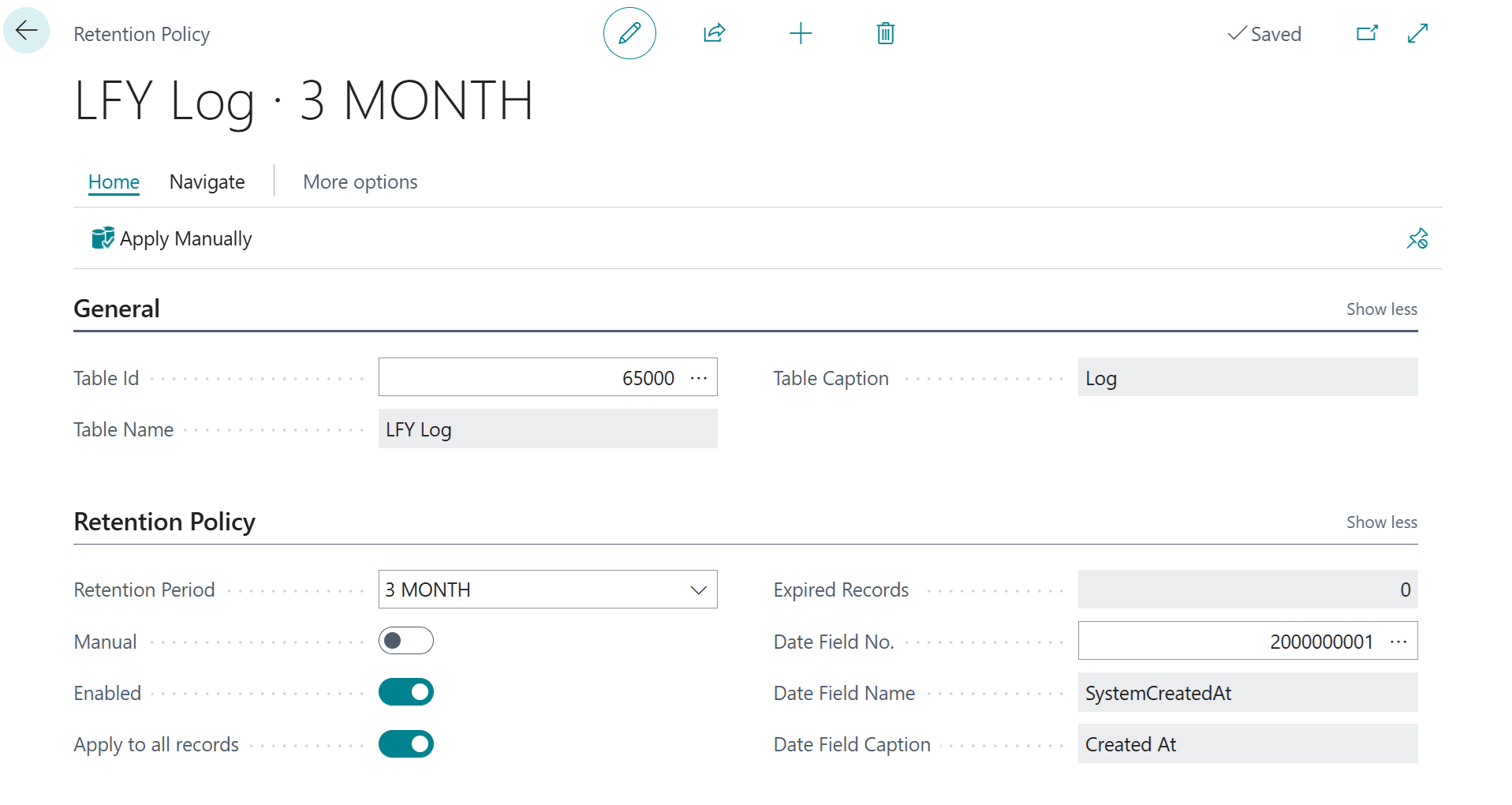
Now we can go to the Retention Policies page and create a new rule by which an automatic Job Queue will clean up outdated data. In this case, I created a rule that automatically deletes all data older than 3 months, based on the SystemCreatedAt system field. We can also configure any Retention Period with a Date Formula.
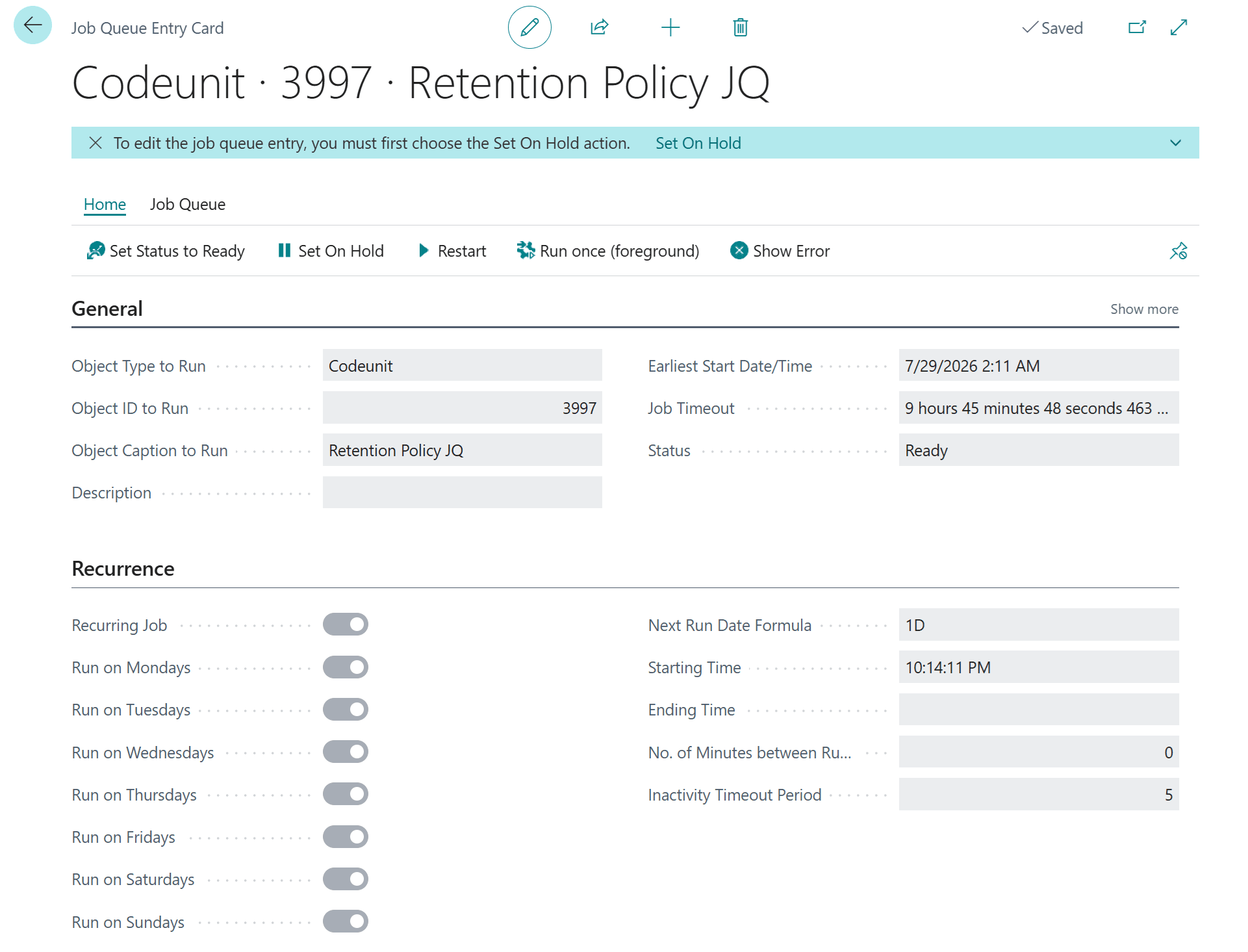
The deletion itself will be performed by a dedicated Job Queue based on the Retention Policy JQ codeunit. You don't need to create it, the system will do it automatically based on your retention policy configuration.
How to use
It may seem that using a ready-made module is very simple. We just call the necessary functions wherever it's convenient with passing GetLastErrorText() and GetLastErrorCallStack():
if IsSuccess then
    Log.LogInformation('Something is done.')
else
    Log.LogError('Something went wrong.', GetLastErrorText(), GetLastErrorCallStack());
In reality, the situation is much more complicated. Let's start with performance: every new insert into the database is a heavy SQL Server operation. We can't log a million entries per process, we need to estimate the approximate frequency of operations. Based on that estimate, you'll be able to understand where this approach can actually be used and where it can't.
Next, what about transactional consistency? How do we make sure that when an error occurs, the log entry still remains in the database rather than being rolled back together with the transaction? How do we make sure the log doesn't start a new transaction where it shouldn't?
The simplest answer is, once again, telemetry, which is sent asynchronously to Application Insights. But that will be the topic of the next article, since here we're looking at the simple case of a table-based log. For the same reason, we won't cover calling a table-based log via StartSession or the Task Scheduler, the right approach is simply to use telemetry instead.
Still, in simple scenarios we can easily manage performance by keeping an eye on where we call the log. We can also use explicit commits to ensure transactional consistency. For clarity, I've created a demo page that will serve as a demonstration of how to properly use this log to achieve transactional consistency.
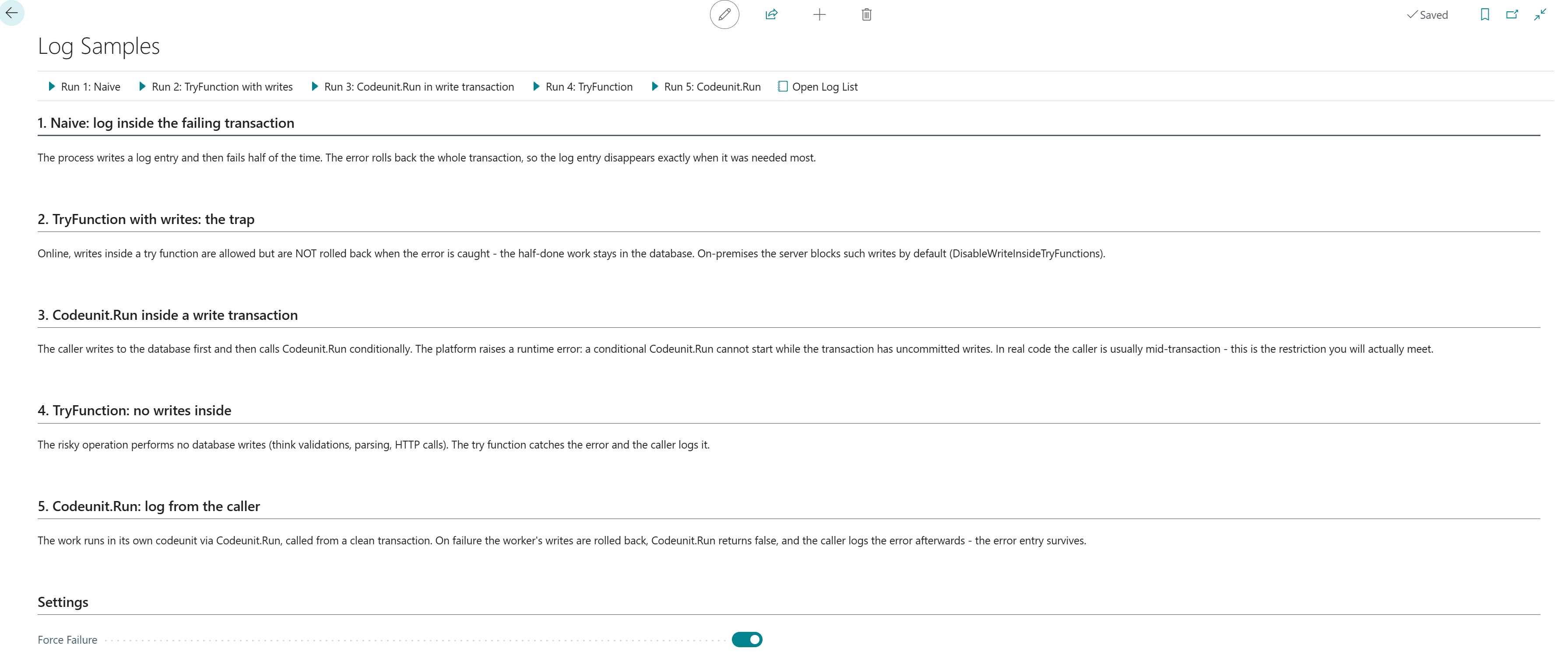
We will walk through five scenarios, from incorrect to correct, and close with a short comparison:
- Scenario 1: naive
- Scenario 2: Try Function with writes
- Scenario 3: Run Codeunit in write transaction
- Scenario 4: Try Function without writes
- Scenario 5: Run codeunit not in write transaction
- Scenarios overview
- TryFunction vs. if Codeunit.run
Scenario 1: naive
Let's look at the simplest, naive scenario: suppose we log something before an operation starts, and then during the operation itself a runtime error occurs. For this, I've prepared a simple DoWork() method:
internal procedure DoWork()
var
    Log: Codeunit "LFY Log";
    StepLbl: Label 'Worker: work item written to the database', Locked = true;
begin
    Log.LogInformation(StepLbl);
    FailRandomly();
end;

internal procedure FailRandomly()
var
    SimulatedErr: Label 'Simulated failure while processing the work item.';
begin
    if ForceFailure then
        Error(SimulatedErr);
    if GetOneOrTwo() = 1 then
        Error(SimulatedErr);
end;
If we call this method and it succeeds, we will see two new Information entries. But in case of an error, there will be nothing in the database at all, because the runtime error rolls back the transaction together with our log entry. That's definitely not what we wanted.
procedure RunNaiveLogging()
var
    Log: Codeunit "LFY Log";
    Worker: Codeunit "LFY Sample Worker";
    StartedLbl: Label 'Naive scenario: process started', Locked = true;
    SuccessMsg: Label 'The work succeeded, so its log entries survived. Keep running until it fails: the error rolls back the whole transaction, including the log entries - the log stays empty for exactly the run you needed it most.';
begin
    Log.LogInformation(StartedLbl);
    Worker.DoWork();
    Message(SuccessMsg);
end;
Scenario 2: Try Function with writes
Alright, but what if we use the TryFunction decorator? In that case we run into another problem: in Business Central cloud, errors inside a TryFunction do not roll back the transaction. And if it's a Docker container or OnPrem, you'll most likely get an error on any attempt to write to the database inside a TryFunction.
[TryFunction]
local procedure TryDoRiskyWork()
var
    Worker: Codeunit "LFY Sample Worker";
begin
    // Deliberately wrong: DoWork() writes to the database. Online this is
    // allowed but the writes are NOT rolled back when the error is caught;
    // on-premises the server blocks it by default
    // (DisableWriteInsideTryFunctions).
    Worker.DoWork();
end;
procedure RunTryFunctionWithWrites()
var
    Log: Codeunit "LFY Log";
    FailedLbl: Label 'TryFunction-with-writes scenario: work item failed', Locked = true;
    SuccessMsg: Label 'The work succeeded.';
    FailedMsg: Label 'The work failed, but unlike Codeunit.Run the writes made inside the try function were NOT rolled back: the worker''s entry is still in the log, next to the error entry. That surviving entry claims work happened that was never completed.';
begin
    if TryDoRiskyWork() then
        Message(SuccessMsg)
    else begin
        Log.LogError(FailedLbl, GetLastErrorText(), GetLastErrorCallStack());
        Message(FailedMsg);
    end;
end;
Looks like it's really bad idea.
Scenario 3: Run Codeunit in write transaction
So maybe the if Codeunit.Run() pattern will help us? Yes, but it has to be used correctly, take a look at the example below. This code will throw a runtime error, because a write transaction was performed before the if Codeunit.Run() call. The platform is explicitly telling you that you're violating transactional consistency. Yes, you can simply add a Commit() before calling the codeunit. But you should only do this if you're sure that transactions saved halfway through won't harm the consistency of the system. Do it only when you are sure what you are doing.
I actually use this method a lot, because it's the most flexible one, but it also demands attentiveness and a solid understanding of what's going on.
procedure RunCodeunitRunInWriteTransaction()
var
    Log: Codeunit "LFY Log";
    StartedLbl: Label 'Write-transaction scenario: step written before Codeunit.Run', Locked = true;
    FailedLbl: Label 'Write-transaction scenario: work item failed', Locked = true;
    SuccessMsg: Label 'The worker succeeded.';
    FailedMsg: Label 'The worker failed and the error was logged from the caller.';
begin
    // Looks like the correct pattern from scenario 5, but the
    // LogInformation above opens a write transaction - so the conditional
    // Codeunit.Run below raises a platform runtime error instead of
    // running. This is the restriction you meet in real code, where the
    // caller is usually mid-transaction.
    Log.LogInformation(StartedLbl);
    //We can add  here Commit(); to avoid runtime error
    //but we have to understand transaction consistency and boundaries
    if Codeunit.Run(Codeunit::"LFY Sample Worker") then
        Message(SuccessMsg)
    else begin
        Log.LogError(FailedLbl, GetLastErrorText(), GetLastErrorCallStack());
        Message(FailedMsg);
    end;
end;
It's possible to use, but only with clear understanding.
Scenario 4: Try Function without writes
So now we move on to the completely safe scenarios. For example, we can use a TryFunction if we're certain that no database writes will ever happen inside it. This could be some kind of validation, parsing, HTTP requests, and so on. In such cases, a TryFunction is safe to use.
procedure RunWithTryFunction()
var
    Log: Codeunit "LFY Log";
    FailedLbl: Label 'TryFunction scenario: validation failed', Locked = true;
    SuccessMsg: Label 'The validation succeeded.';
    FailedMsg: Label 'The validation failed and the error was logged. Nothing was written inside the try function, so there was nothing to roll back.';
begin
    if TryValidateWorkItem() then
        Message(SuccessMsg)
    else begin
        Log.LogError(FailedLbl, GetLastErrorText(), GetLastErrorCallStack());
        Message(FailedMsg);
    end;
end;
[TryFunction]
local procedure TryValidateWorkItem()
var
    Worker: Codeunit "LFY Sample Worker";
begin
    // No database writes here - the only kind of work a try function
    // should wrap: validations, parsing, HTTP calls.
    Worker.FailRandomly();
end;
Safe, but only if you're absolutely certain that no database writes will ever occur inside the TryFunction.
Scenario 5: Run codeunit not in write transaction
This is essentially a scenario similar to 3, but simpler. We can safely use if Codeunit.Run() as long as we're certain that no database write transactions occurred before it.
procedure RunWithCodeunitRun()
var
    Log: Codeunit "LFY Log";
    FailedLbl: Label 'Codeunit.Run scenario: work item failed', Locked = true;
    SuccessMsg: Label 'The worker succeeded and its log entry was committed.';
    FailedMsg: Label 'The worker failed. Its writes were rolled back and the error was logged from the caller. Open the log list: the error entry is there, the worker''s entry is not.';
begin
    if Codeunit.Run(Codeunit::"LFY Sample Worker") then
        Message(SuccessMsg)
    else begin
        Log.LogError(FailedLbl, GetLastErrorText(), GetLastErrorCallStack());
        Message(FailedMsg);
    end;
end;
Safe, as long as we're certain that no database write transactions occurred before the call.
Scenarios overview
| # | Scenario | Work rolls back on failure? | Error entry survives? | Verdict |
|---|---|---|---|---|
| 1 | Naive: log inside the failing transaction | Yes — log entries included | ❌ lost with the rollback | ❌ Never |
| 2 | TryFunction with writes | ❌ half-done work stays | ✅ but next to a lying entry | ❌ Never |
| 3 | Codeunit.Run inside a write transaction | Without Commit(): runtime error, everything rolls back. With Commit() first: worker rolls back, but everything before the commit is already permanent |
❌ without Commit() / ✅ with it |
⚠️ Works with Commit() — dangerous without understanding transaction consistency and boundaries |
| 4 | TryFunction: no writes inside | Nothing to roll back | ✅ | ✅ For non-writing work (validation, parsing, HTTP) |
| 5 | Codeunit.Run: log from the caller | ✅ worker's writes only | ✅ | ✅ The default pattern |
TryFunction vs. if Codeunit.Run
[TryFunction] |
Codeunit.Run |
|
|---|---|---|
| Catches the error | ✅ returns false |
✅ returns false |
| Rolls back the work's writes on error | ❌ never | ✅ back to the last commit |
| Callable with uncommitted writes in the transaction | ✅ | ❌ platform runtime error |
| DB writes inside — online | Allowed, not rolled back | Allowed, rolled back on error |
| DB writes inside — on-premises | Blocked by default (DisableWriteInsideTryFunctions) |
Allowed, rolled back on error |
| Right job | Non-writing operations | Anything that writes |
Benefits and Limitations
If we sum up everything we've discussed, it becomes clear that this kind of logging comes with benefits and limitations you need to be aware of in advance.
Benefits:
- Zero infrastructure, works out of the box
- Visible to users & consultants directly in the client
- True audit record, part of the transaction
- Drill-down from a log entry to the source record
- Familiar filters on a familiar list page
- Works everywhere, even offline and on-premises
- No Azure resources, no ingestion fees
Limitations:
- Rolls back with failing transactions, needs the right call-site patterns
- No cross-tenant visibility for ISVs
- Blind during install/upgrade failures
- No aggregation, trends, or alerts
- No correlation across sessions
- Consumes paid database storage
- Hot log table can lock business processes
Notice that the biggest benefit and the biggest limitation are the same fact: the log is part of the transaction, that's what makes it a trustworthy audit record, and what makes it disappear with a rollback.
Summary
Logging is one of those things that looks trivial, but in reality it's a deep and complex topic. That's why it might be a good idea to think about telemetry, where most of the challenges are actually solved. In any case, together we've built a fairly simple, unified interface for working with table-based logs. It will fit any Business Central app where this approach makes sense.
We've also figured out how to properly configure a Retention Policy, and what it even is. It seems to me that many people don't know this functionality exists in Business Central at all.
And of course, we've worked out why transactional consistency can become a problem for this kind of approach.
In the next article, we will take a look at telemetry: what it is, how to use it, and its pros and cons compared to the approach we discussed today.