'%3e%3cpath%20fill='%23C0E1E2'%20d='M7%200H4v20h3V0Z'%20/%3e%3cpath%20fill='%23C0E1E2'%20d='M16%2010h-3v10h3V10Z'%20/%3e%3cpath%20fill='%23C0E1E2'%20d='M0%2013v3h20v-3H0Z'%20/%3e%3cpath%20fill='%23C0E1E2'%20d='M0%204v3h10V4H0Z'%20/%3e%3cpath%20fill='%2360B2B6'%20d='M19.996%204v3H13V0h3v4h3.996Z'%20/%3e%3c/g%3e%3cdefs%3e%3cclipPath%20id='clip0_1029_1800'%3e%3cpath%20fill='%23fff'%20d='M0%200h20v20H0z'%20/%3e%3c/clipPath%3e%3c/defs%3e%3c/svg%3e) Data Editor
Data Editor  Subscribe
Parallel Worker for Business Central
I would like to present Parallel Worker, an open-source library for running parallel tasks in pure AL. It offers a unified interface, reliable execution, and, of course, is freely available to anyone who wants to use it. Today, I will explain how I built this library and how it can be useful for developers.
Agenda
- Introduction
- Architecture
- Transaction Safety
- Timeout Behavior
- How to use
- When to use
- When NOT to use
- Monitoring
- Summary
- Source Code
Introduction
First of all, I would like to talk about my motivation for creating a library like this. What specific problem does it solve, and what value can it bring to developers?
In my work, I occasionally come across interesting performance optimization challenges. Very often, the root cause is simply poor application architecture, bad code, and so on. But sometimes the code is written properly, the architecture cannot really be different, and yet the process still needs to be sped up.
In such cases, task parallelization and background execution can help, whenever that is possible. That is exactly what this library is designed for: splitting heavy workloads into chunks and processing them in parallel to improve performance.
I had several goals that I wanted to achieve: reliability, a unified interface, and ease of use. I am not sure I managed to accomplish all of them fully, but these were the principles I aimed for throughout the process.
I would also like to point out that Parallel Worker is fully covered by automated tests across a wide range of scenarios.
Architecture
Let's look at the available primitives for working with background and parallel tasks in AL. I have mentioned this before when I implemented parallel record reading for Data Editor Tool:
Parallel Worker uses StartSession, and there are several reasons for that. If you look at this table, it becomes clear why StartSession was the right choice.
| StartSession | Page Background Tasks | Task Scheduler | Job Queue | |
|---|---|---|---|---|
| Can write to DB | Yes | No (read-only) | Yes | Yes |
| Starts immediately | Yes | Yes | No (queued) | No (scheduled) |
| Survives restart | No | No | Yes | Yes |
| Tied to a page | No | Yes | No | No |
| Concurrent sessions | You control | Max 5 per session | Platform-controlled | Platform-controlled |
| Timeout parameter | Yes (Duration) |
Yes (max 10 min) | No | No |
| Detect dead sessions | Yes (IsSessionActive) |
N/A | No | No |
Page Background Tasks are read-only and canceled if the user navigates away, unsuitable for a general-purpose library. Task Scheduler and Job Queue are designed for deferred or recurring work, not real-time parallelism, they may not start for seconds or minutes, and it's hard to control how many run concurrently.
StartSession is the only option that fires immediately, supports database writes, allows controlling concurrency, and provides session lifecycle management (IsSessionActive, Duration timeout). The tradeoff is no restart survival, but parallel batches are short-lived (seconds to minutes), the monitoring pages handle stuck batches if a restart occurs.
I would also suggest taking a look at the library’s high-level architecture diagram:
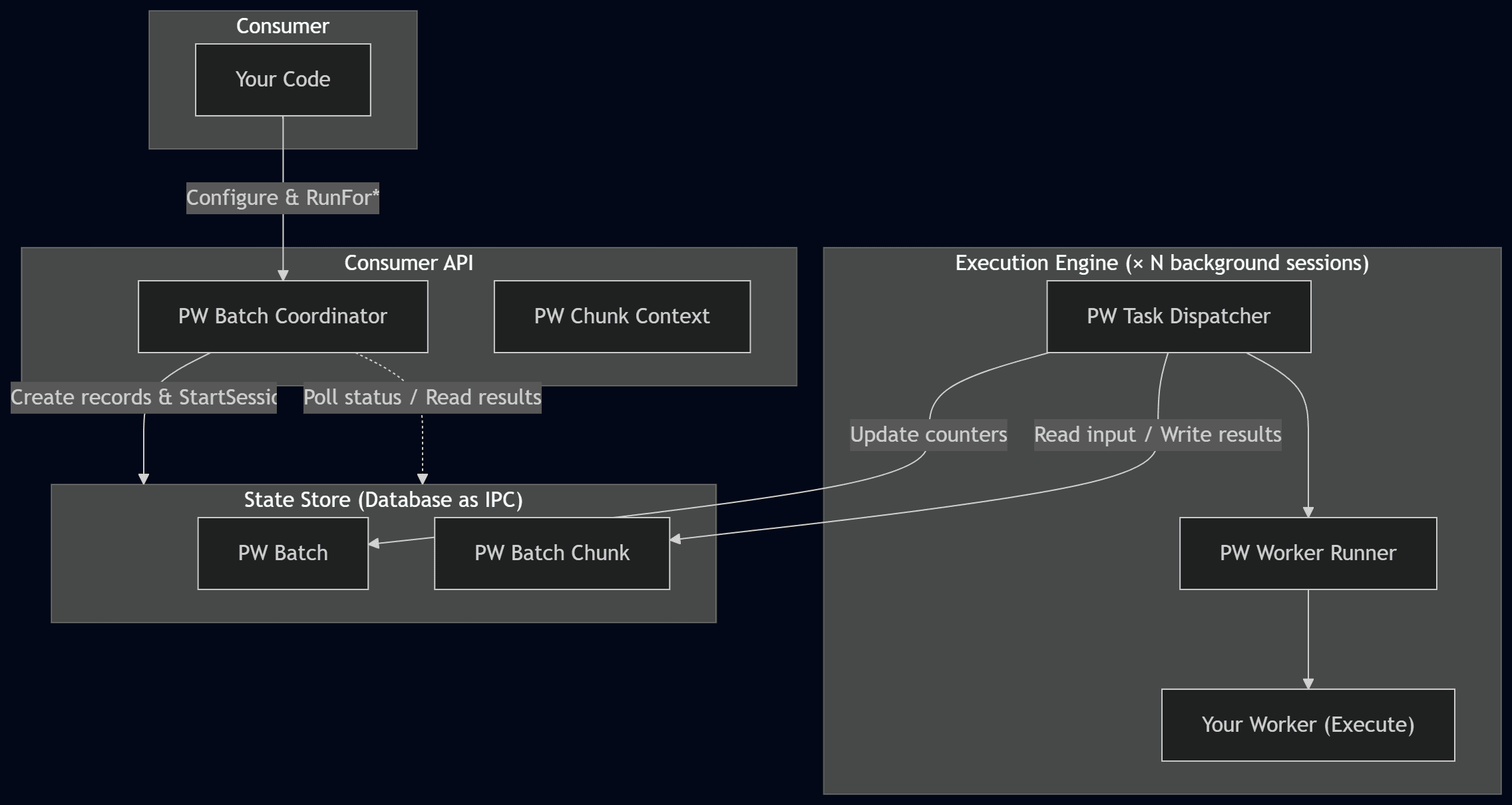
This means that the library is divided into three main layers:
| Layer | Objects | Role |
|---|---|---|
| Consumer API | PW Batch Coordinator, PW Chunk Context |
The objects you interact with. Coordinator to run batches, ChunkContext inside your worker's Execute. |
| Execution Engine | PW Task Dispatcher, PW Worker Runner |
Internal. Each background session runs the dispatcher, which calls your worker. |
| State Store | PW Batch, PW Batch Chunk |
Database tables used as an IPC channel between sessions. |
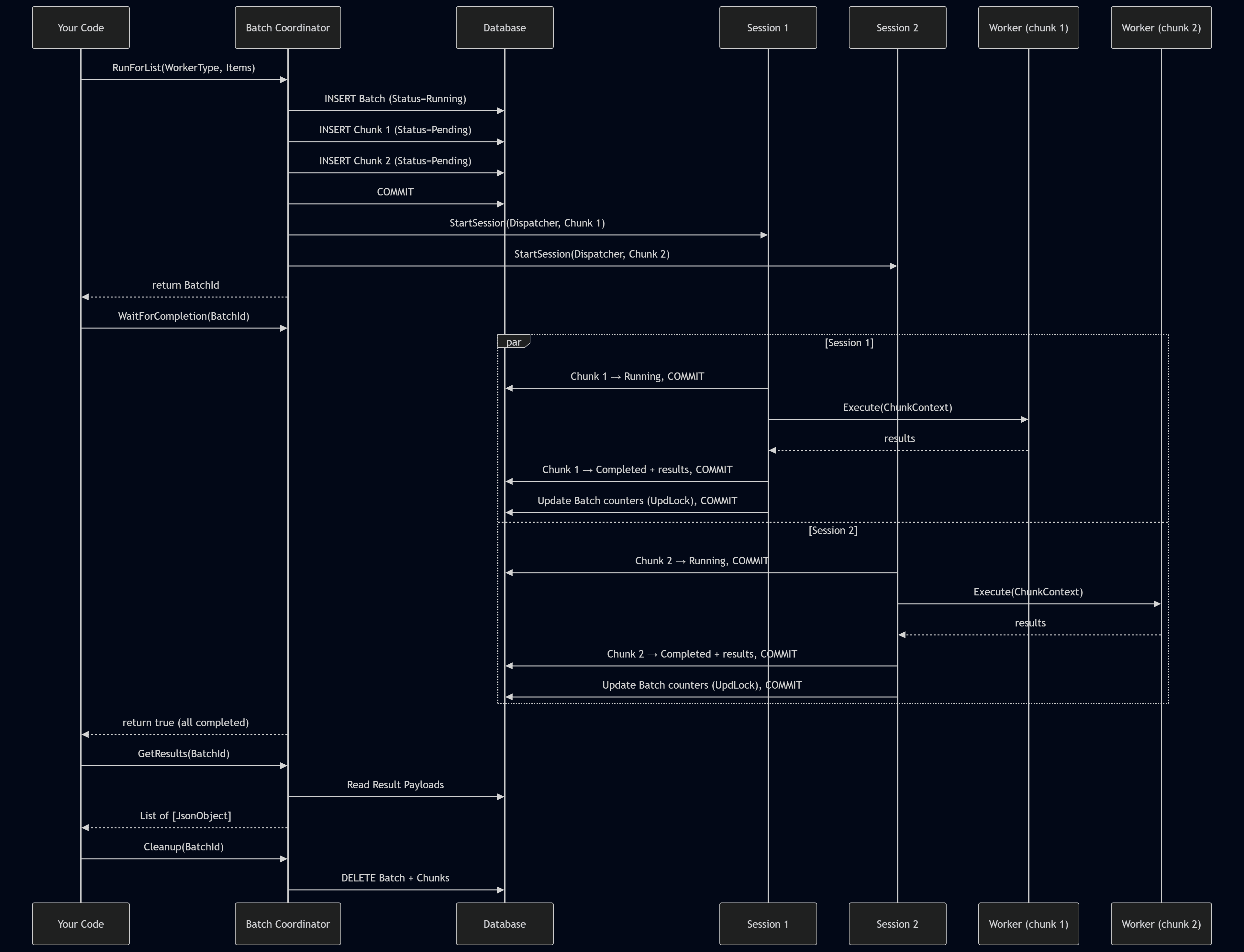
Of course, this is a very high-level overview. Next, we will look at some more interesting implementation details. For a more detailed understanding, we can take a look at the runtime execution flow:
Transaction Safety
In fact, transaction safety is critically important for Parallel Worker, because we are splitting one large process into smaller parts, process them in separate background sessions, and that creates certain risks of losing transactional consistency, in other words ACID guarantees. That is why several mechanisms were introduced to achieve the highest possible level of reliability.
The RunFor* methods are key entry points for starting the library, so I added a check for Database.IsInWriteTransaction(). This makes it possible to ensure that the current transaction is clean, meaning that we are either starting a new process or deliberately issuing a Commit before calling the RunFor* methods, since the library must call Commit internally to persist chunk records before StartSession. If the caller has uncommitted changes, that Commit would silently persist them, which is dangerous and unexpected behavior.
local procedure GuardNoWriteTransaction()
begin
  if Database.IsInWriteTransaction() then
    Error(WriteTransactionErr);
end;
Next, the RunFor* methods create the Batch and Chunk records. Since the next step is to start a StartSession for each chunk, the library first persists this data to the database by issuing a Commit.
// Must commit batch and chunk records before StartSession.
// StartSession fires immediately — if this transaction rolled back,
// the background sessions would look for chunk records that no longer exist.
Commit();
StartBatch(BatchId);
Each chunk starts the Task Dispatcher through StartSession. Task Dispatcher marks the chunk as Running and persists this with a Commit, so the polling caller can track progress via ReadUncommitted.
The next step is to launch the Worker Runner using the if Codeunit.Run() pattern. This allows us not only to catch all errors inside the Worker Runner, but also to roll back the transaction for each chunk in case an error occurs within the Worker Runner. This is why TryFunction will not suit here at all.
// Codeunit.Run rolls back all database changes on failure.
// This is safer than TryFunction, which does NOT roll back.
// If the worker accidentally modifies records and then errors,
// Codeunit.Run ensures those partial writes are reverted.
ClearLastError();
if Codeunit.Run(Codeunit::"PW Worker Runner", Rec) then
Worker Runner, in turn, calls the IParallelWorker interface, which is essentially the interface that contains our concrete task implementation. If someone issues a Commit inside that implementation, we lose the ability to roll back on error, any changes made before the Commit would stay persisted, leaving partial writes in the database. That is why the CommitBehavior::Error function attribute is applied at the level where this interface is called. In other words, any Commit within the interface implementation context will raise an error, because it violates consistency. Of course, this will not protect against implicit commits, but making that happen still takes some effort. At the end of the day, there is also a certain level of responsibility on the developer using the library.
[CommitBehavior(CommitBehavior::Error)]
local procedure RunWorkerNoCommit(WorkerType: Enum "PW Worker Type"; var Context: Codeunit "PW Chunk Context")
var
  Worker: Interface "PW IParallel Worker";
begin
  // CommitBehavior::Error prevents workers from calling Commit() inside Execute.
  // If a worker calls Commit(), a runtime error is raised immediately.
  // Codeunit.Run catches it and rolls back all database changes.
  Worker := WorkerType;
  Worker.Execute(Context);
end;
Of course, once the IParallelWorker implementation has finished executing, we also persist the result with a Commit, regardless of whether errors were caught or the execution completed successfully.
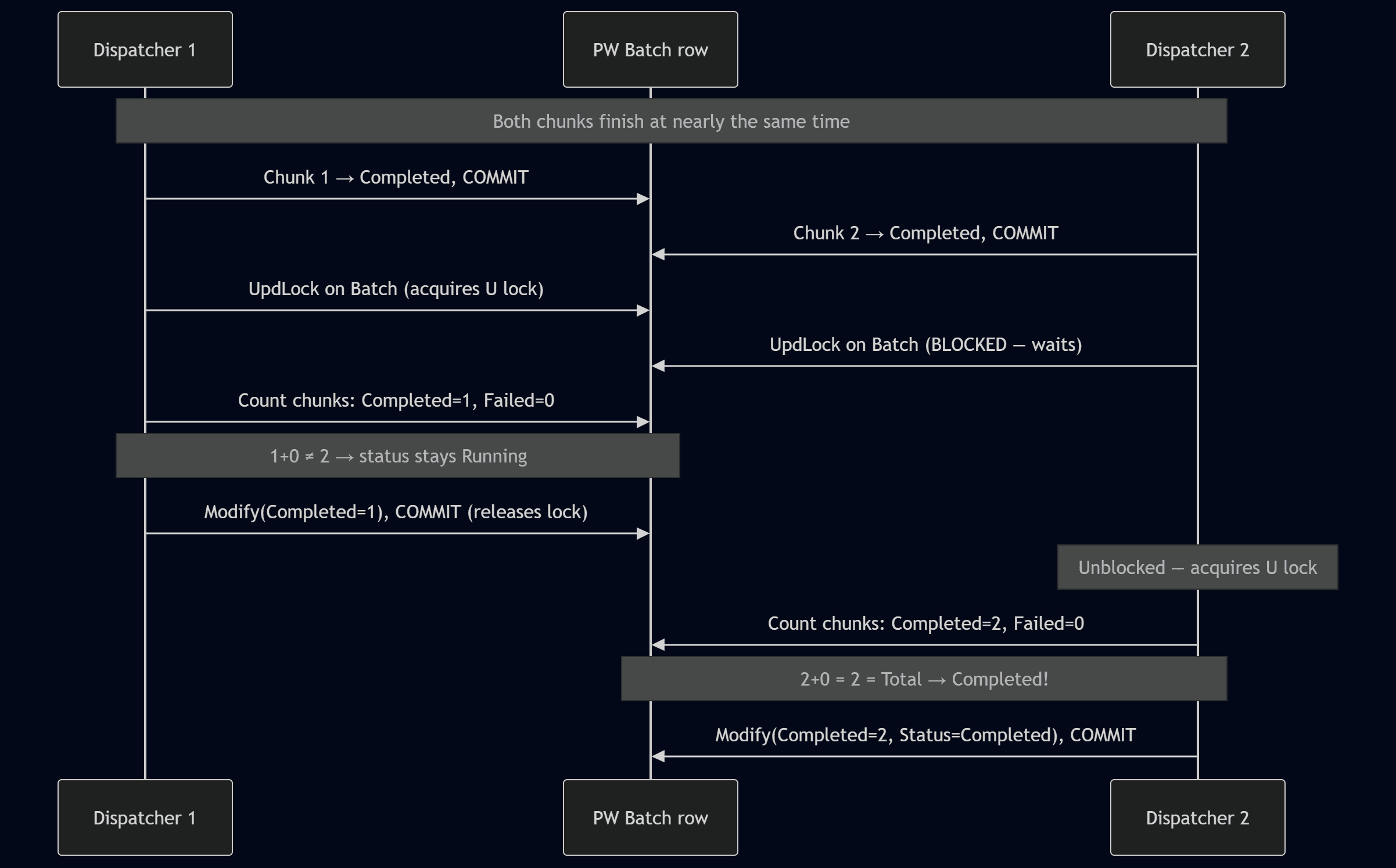
The next important step, after a chunk has finished and its result has been saved, is updating the Batch. After all, the overall Batch status is essentially determined by the combined results of all chunks. But how can we ensure that this update is safe? In practice, several chunks may be running in parallel and may attempt to access the Batch at any time. Well, we can use UpdLock hint right before record reading and modifying.
In the past, I would have used Rec.LockTable, but this method has a significant drawback: it modifies the global session state, causing all subsequent reads on that table within the session to use UpdLock, including reads from event subscribers that have no update intent. IsolationLevel::UpdLock is more precise, it only affects the specific record variable, leaving other code in the session unaffected. ReadCommitted ensures we only count chunks where status has been committed by their dispatcher, avoiding stale reads from in-progress transactions.
Once the Batch update is complete, a Commit is issued to release the record lock. This allows us to avoid unnecessarily long waits, so other sessions can update the Batch without being blocked.
local procedure UpdateBatchCounters(BatchId: Guid)
var
  Batch: Record "PW Batch";
  Chunk: Record "PW Batch Chunk";
  CompletedCount: Integer;
  FailedCount: Integer;
begin
  // UpdLock on the Batch row serializes concurrent counter updates
  // without disabling Tri-State Locking for the entire table.
  Batch.ReadIsolation := IsolationLevel::UpdLock;
  Batch.Get(BatchId);

  // ReadCommitted ensures we see committed chunk statuses only.
  // Each dispatcher commits its chunk status before calling this procedure.
  Chunk.ReadIsolation := IsolationLevel::ReadCommitted;
  Chunk.SetRange("Batch Id", BatchId);
  Chunk.SetRange(Status, "PW Chunk Status"::Completed);
  CompletedCount := Chunk.Count();

  Chunk.SetRange(Status, "PW Chunk Status"::Failed);
  FailedCount := Chunk.Count();

  ...

  Batch.Modify();
  // Release the UpdLock acquired above.
  // Without this commit, the lock is held until the session ends,
  // blocking other chunks that are finishing concurrently.
  Commit();
end;
Here is a diagram which explain concurrency and locking for Parallel Worker on high-level:
It's also worth mentioning that if some sessions fail to start we force update Batch status and commit previous data.
if FailedToStart > 0 then begin
  // Commit failed-to-start chunk statuses first, so background sessions
  // that are already running can see them in UpdateBatchCounters.
  // This also releases all locks from the FindSet loop, preventing
  // deadlocks when we take UpdLock below.
  Commit();
  RecountBatchCounters(BatchId);
end;
As a result, after calling RunFor*, we can invoke the WaitForCompletion method if we need a blocking execution mode for all tasks. This method essentially blocks the current session until the batch is completed or the timeout expires. It is implemented using a loop with Sleep.
Timeout Behavior
Parallel Worker allows you to configure two types of timeout, each serving a different purpose.
Batch Timeoutdefines a global timeout for the entire Batch.Session Timeoutmakes it possible to set a timeout for each individual session within the context of a Chunk.
This makes it possible to configure timeouts flexibly and ensure that hung or long-running tasks do not block the batch indefinitely. The overall behavior of these timeouts can be illustrated in the following diagram:
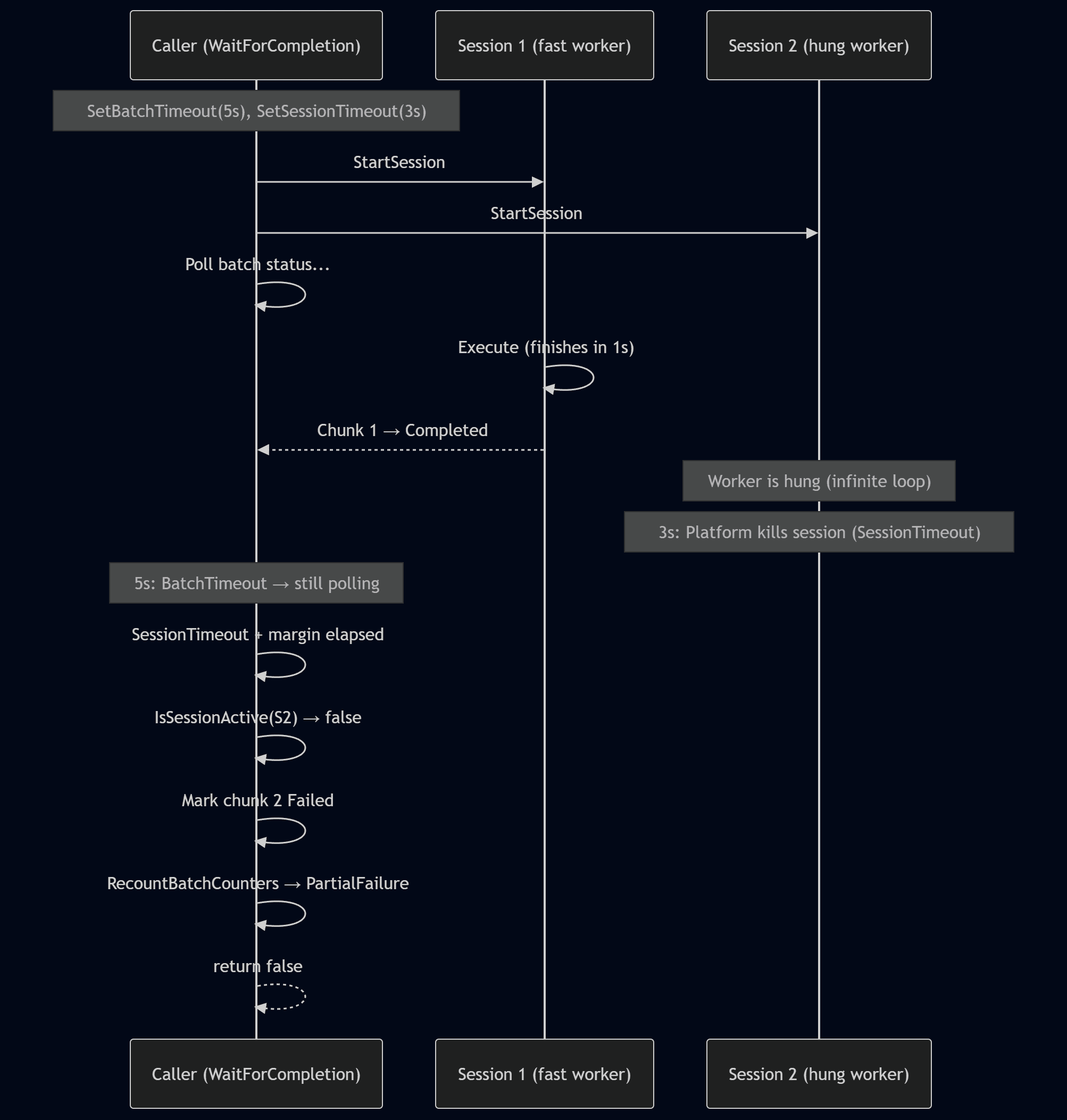
When SetSessionTimeout is configured, the platform kills background sessions that exceed the time limit. However, this is a hard kill, the dispatcher's error handling never runs, leaving the chunk stuck in Running status.
Method WaitForCompletion handles this automatically. After the session timeout plus a short margin, it checks each Running chunk using Session.IsSessionActive. If the session is dead, the chunk is marked Failed with a "Session terminated" error message, and batch counters are recounted using the same UpdLock pattern as UpdateBatchCounters. This ensures the batch reaches a terminal status (Failed or PartialFailure) even when sessions are killed by timeout.
How to use
Let us move on to the practical use of Parallel Worker. For demonstration purposes, I intentionally created a Sample folder with usage examples. In general, however, the approach is as follows:
- Implement your worker to interface IParallel Worker
- Register it via enum extension in "Worker Type" enum
- Run it
In practice, we create an implementation of the IParallelWorker interface, which essentially contains the actual logic of our task:
codeunit 99100 "PW Sample Worker" implements "PW IParallel Worker"
{
  Access = Internal;

  procedure Execute(var Ctx: Codeunit "PW Chunk Context")
  var
    Items: JsonArray;
    Result: JsonObject;
    WorkDurationMs: Integer;
    i: Integer;
  begin
    Items := Ctx.GetItems();
    WorkDurationMs := Ctx.GetIntInput('WorkDurationMs');

    // Simulate heavy work for each item in Chunk context (subset)
    for i := 1 to Items.Count() do
      Sleep(WorkDurationMs);

    Result.Add('ChunkIndex', Ctx.GetChunkIndex());
    Result.Add('ItemsProcessed', Items.Count());
    Ctx.SetResult(Result);
  end;
}
Register our implementation via enum extension:
enumextension 99100 "PW Sample Worker Type" extends "PW Worker Type"
{
  value(99100; Sample)
  {
    Caption = 'Sample';
    Implementation = "PW IParallel Worker" = "PW Sample Worker";
  }
}
Run it using Run* methods, and use waiting function if you would like to wait until it finished:
  Coordinator: Codeunit "PW Batch Coordinator";
  Items: List of [Text];
  Payload: JsonObject;
  Results: List of [JsonObject];
  Errors: List of [Text];
  BatchId: Guid;
  i: Integer;
begin
  for i := 1 to TaskCount do
    Items.Add(Format(i));

  Payload.Add('WorkDurationMs', WorkDurationMs);

  BatchId := Coordinator
    .SetThreads(ThreadCount)
    .SetBatchTimeout(RunnerBatchTimeoutSec)
    .SetSessionTimeout(RunnerSessionTimeoutMs)
    .RunForList("PW Worker Type"::Sample, Items, Payload);

  if Coordinator.WaitForCompletion(BatchId) then
    Coordinator.GetResults(BatchId, Results)
  else begin
    Coordinator.GetResults(BatchId, Results); //collect partial result
    Coordinator.GetErrors(BatchId, Errors);
  end;

  Coordinator.Cleanup(BatchId); //Cleanup batch and chunks if required
end;
I would also draw attention to the RunForRecords and RunForChunks methods. The first one allows you to automatically split any record using RecordRef, while the second gives you fine-grained control over each chunk for more advanced scenarios.
As example:
codeunit 99101 "PW Sample Record Counter" implements "PW IParallel Worker"
{
  Access = Internal;

  procedure Execute(var Ctx: Codeunit "PW Chunk Context")
  var
    RecRef: RecordRef;
    ChunkSize: Integer;
    Count: Integer;
    Result: JsonObject;
  begin
    Ctx.GetRecordRef(RecRef);
    ChunkSize := Ctx.GetChunkSize();

    repeat
      Count += 1; //your slow process with Chunk of records
    until (RecRef.Next() = 0) or (Count >= ChunkSize);

    Result.Add('ChunkIndex', Ctx.GetChunkIndex());
    Result.Add('RecordCount', Count);
    Ctx.SetResult(Result);
  end;
}
enumextension 99100 "PW Sample Worker Type" extends "PW Worker Type"
{
  value(99101; RecordCounter)
  {
    Caption = 'Record Counter';
    Implementation = "PW IParallel Worker" = "PW Sample Record Counter";
  }
}
BatchId := Coordinator
  .SetThreads(ThreadCount)
  .SetBatchTimeout(RunnerBatchTimeoutSec)
  .SetSessionTimeout(RunnerSessionTimeoutMs)
  .RunForRecords("PW Worker Type"::RecordCounter, RecRef, Payload);
When to use
The library splits work into chunks across N threads (e.g., 500 items with 4 threads = 4 chunks of ~125 items). Each chunk processes its items sequentially, the speedup comes from running chunks concurrently.
| Scenario | Why it works | What a chunk does |
|---|---|---|
| Calling external REST APIs (tax calculation, address validation, ERP sync) | Network latency dominates - N threads make N concurrent HTTP call streams | Iterates its ~125 items, calling the API sequentially within the chunk |
| Heavy per-record computation (complex pricing, BOM explosion, cost rollup) | CPU-bound work split across multiple concurrent sessions | Processes its slice of records |
| Data validation across large datasets (dimensions, credit limits, inventory) | Read-heavy, no writes, fully independent | Validates its slice, collects errors into results |
| Sending emails or notifications | I/O-bound (SMTP/HTTP) - parallelizes naturally | Sends its batch of emails |
| Data export/transformation (build JSON/XML for integration) | CPU + I/O, no shared state | Transforms its record range |
When NOT to use
| Anti-pattern | Why it fails |
|---|---|
| Posting documents (Sales Orders, Purchase Orders, Journals) | Each posting touches shared ledgers, number series, and running totals — chunks deadlock on the same rows |
| Operations using Number Series with Gaps Allowed = false | BC locks the Number Series Line record to guarantee sequential numbers — concurrent sessions serialize on that lock |
| Updating running totals or aggregate fields | Inherently serial — each update depends on the previous value |
| Small datasets | Session startup overhead exceeds the time saved by parallelism |
| Work where items depend on each other's results | No ordering guarantee across chunks, no cross-chunk communication |
Monitoring
Since each Batch and its related Chunks are persisted at the database level, this makes it possible to create pages based on these tables for convenient monitoring.
Batches is a list of all batches, where we can view statuses, counters for completed and failed chunks, creation and completion date/time, and of course navigate to a more detailed view through View Chunks.

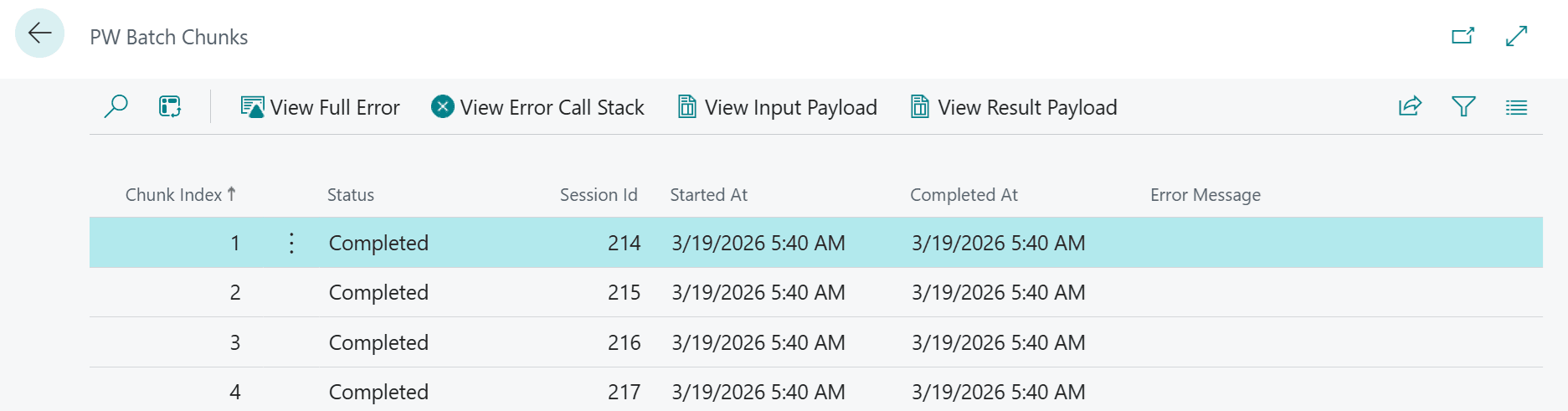
Chunks is a list of all chunks within a batch. Here, we can see the status of each chunk, the session ID in which it was started, and its creation and completion date/time. Actions are also available to view the Input Payload, Result Payload, and Error or Error Call Stack in case a chunk has failed.
Summary
Today, we discussed what the Parallel Worker library does and how it can be useful. We also explored several of the mechanisms and principles behind how it works, and I believe this information may be valuable to developers in daily work.
I would be very glad to hear feedback from the community. Please share what you think about Parallel Worker. As for me, I plan to use this library in several scenarios where it is a good fit.